Kutuki Mobile App Redesign
Kutuki Mobile App Redesign
Project
Kutuki Mobile App Redesign
Duration
6 months
Role
Lead Product Designer
Monthly Active User (MAU)
From 10K to 600K
Company size
20+
About Project
About Project
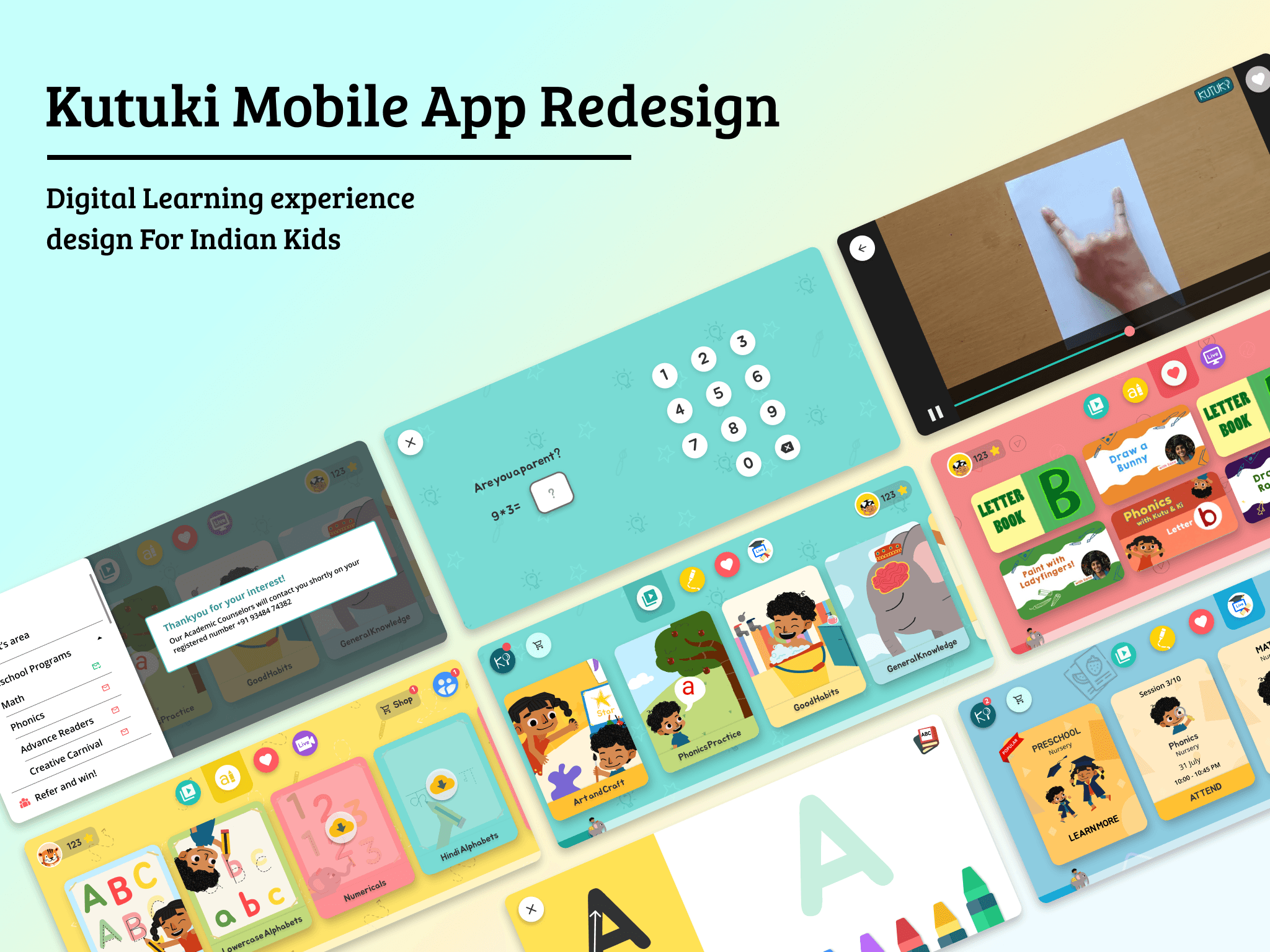
Redesigning the User Experience and User Interface of the existing Kutuki Mobile app.
Objective:
• Understanding the user and product requirements through user and market research
• Ideate on various possibilities of product innovation and expansion
• Build a user friendly mobile experience for the target users such that it increases the engagement rate of the product.
Scope of work:
• Working with the Product development team to conduct user research and testing to draw insights for improving the user experience
• Working with the Head of Design to design immersive and interactive experiences
• Working with the Design team to brainstorm and develop potential ideas into concepts and build development ready deliverables.
Redesigning the User Experience and User Interface of the existing Kutuki Mobile app.
Objective:
• Understanding the user and product requirements through user and market research
• Ideate on various possibilities of product innovation and expansion
• Build a user friendly mobile experience for the target users such that it increases the engagement rate of the product.
Scope of work:
• Working with the Product development team to conduct user research and testing to draw insights for improving the user experience
• Working with the Head of Design to design immersive and interactive experiences
• Working with the Design team to brainstorm and develop potential ideas into concepts and build development ready deliverables.
60x
User Growth
50%
User Engagement
3X
Monthly Revenue
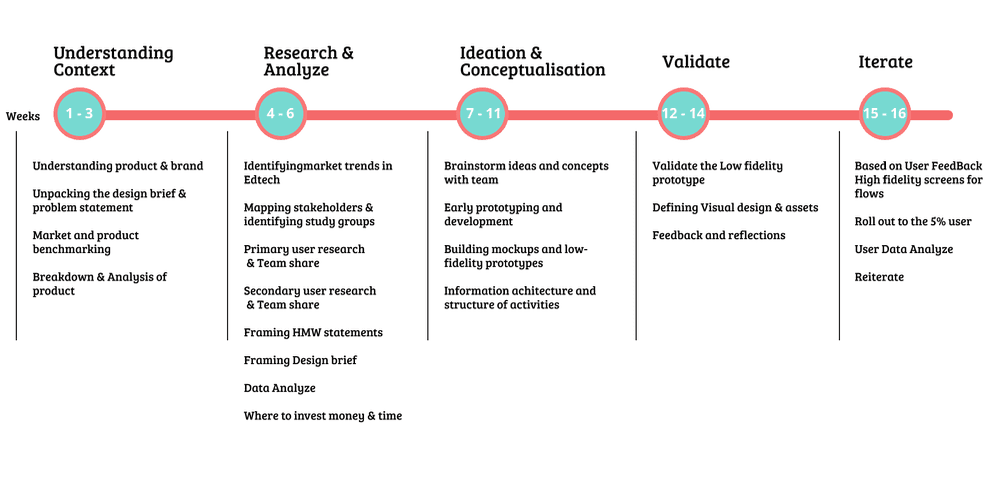
Project Timeline
Project Timeline
Market Research
Market Research
What was lacking in Indian edtech products?
Edtech Overview
Children confined to indoor environments often miss out on cognitive development opportunities that come through peer interaction, play, and social experiences.
While educational institutions have quickly adopted digital platforms to continue learning during disruptions, seamless integration across various tools and platforms remains limited.
The edtech sector has introduced innovative approaches such as live classes, discovery-based learning, self-paced modules, and gamification.
Despite this progress, only about 4% of the Indian education sector has been digitized to date, indicating significant untapped potential.
Edtech for Preschoolers
Preschoolers, newly exposed to digital interfaces, struggle with abstract symbols. Therefore, effective apps for this age group must replicate real-life interactions and emphasize learning through play.
Many parents view digital tools not as a replacement, but as a supplement to traditional preschool education.
What was lacking in Indian edtech products?
Edtech Overview
Children confined to indoor environments often miss out on cognitive development opportunities that come through peer interaction, play, and social experiences.
While educational institutions have quickly adopted digital platforms to continue learning during disruptions, seamless integration across various tools and platforms remains limited.
The edtech sector has introduced innovative approaches such as live classes, discovery-based learning, self-paced modules, and gamification.
Despite this progress, only about 4% of the Indian education sector has been digitized to date, indicating significant untapped potential.
Edtech for Preschoolers
Preschoolers, newly exposed to digital interfaces, struggle with abstract symbols. Therefore, effective apps for this age group must replicate real-life interactions and emphasize learning through play.
Many parents view digital tools not as a replacement, but as a supplement to traditional preschool education.
Competitive Products
Competitive Products
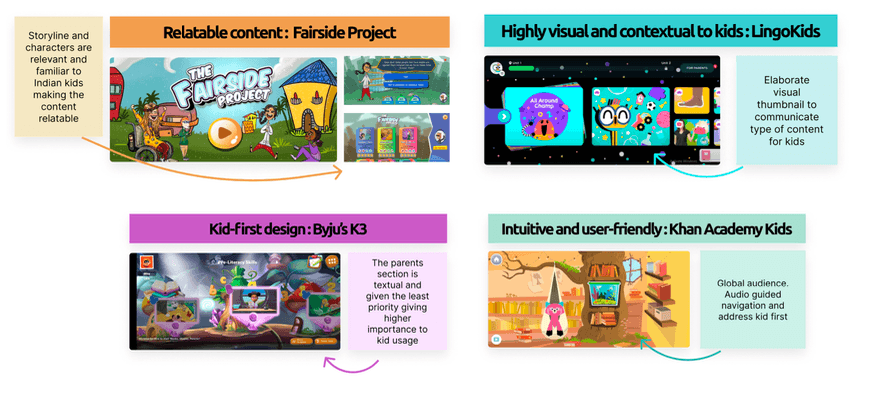
Competitive products to Kutuki from around the world were analyzed by the team to identify core features and design principles that made their user experiences intuitive for the target audience. This research also helped evaluate their overall product offerings in comparison to Kutuki.
Competitive products to Kutuki from around the world were analyzed by the team to identify core features and design principles that made their user experiences intuitive for the target audience. This research also helped evaluate their overall product offerings in comparison to Kutuki.
Gap addressed with Kutuki
Gap addressed with Kutuki
Based on background research and insights provided by the sponsor, Kutuki was analyzed to understand the specific market gap it aims to fill and how its product offerings align with this need.
Identified Market Gap
Through the product study and secondary research, it became evident that while technology has made education more accessible and affordable, Indian preschoolers often rely on foreign media for early learning. Children across India are growing up with content like Sesame Street (American), Peppa Pig (British), and Doraemon (Japanese), which lack relevance to their cultural context. In some cases, they may not have access to structured learning content at all.
This highlights a clear gap: the absence of culturally rooted, India-specific early learning content.
Kutuki bridges this gap by offering a brand that is designed specifically for Indian preschoolers, both in content and context.
Kutuki’s Focus Areas
Kutuki addresses this gap by creating a culturally resonant and affordable learning experience tailored to the needs of Indian preschoolers. The platform emphasizes:
Culturally relevant content grounded in Indian life, languages, and values.
Engaging learning formats including animated videos, interactive activities, stories, and songs.
An accessible platform that ensures reach across diverse socio-economic backgrounds.
Kutuki reimagines early childhood education in India by blending play and learning through content that feels familiar and meaningful to its young audience.
Based on background research and insights provided by the sponsor, Kutuki was analyzed to understand the specific market gap it aims to fill and how its product offerings align with this need.
Identified Market Gap
Through the product study and secondary research, it became evident that while technology has made education more accessible and affordable, Indian preschoolers often rely on foreign media for early learning. Children across India are growing up with content like Sesame Street (American), Peppa Pig (British), and Doraemon (Japanese), which lack relevance to their cultural context. In some cases, they may not have access to structured learning content at all.
This highlights a clear gap: the absence of culturally rooted, India-specific early learning content.
Kutuki bridges this gap by offering a brand that is designed specifically for Indian preschoolers, both in content and context.
Kutuki’s Focus Areas
Kutuki addresses this gap by creating a culturally resonant and affordable learning experience tailored to the needs of Indian preschoolers. The platform emphasizes:
Culturally relevant content grounded in Indian life, languages, and values.
Engaging learning formats including animated videos, interactive activities, stories, and songs.
An accessible platform that ensures reach across diverse socio-economic backgrounds.
Kutuki reimagines early childhood education in India by blending play and learning through content that feels familiar and meaningful to its young audience.
User Persona
User Persona
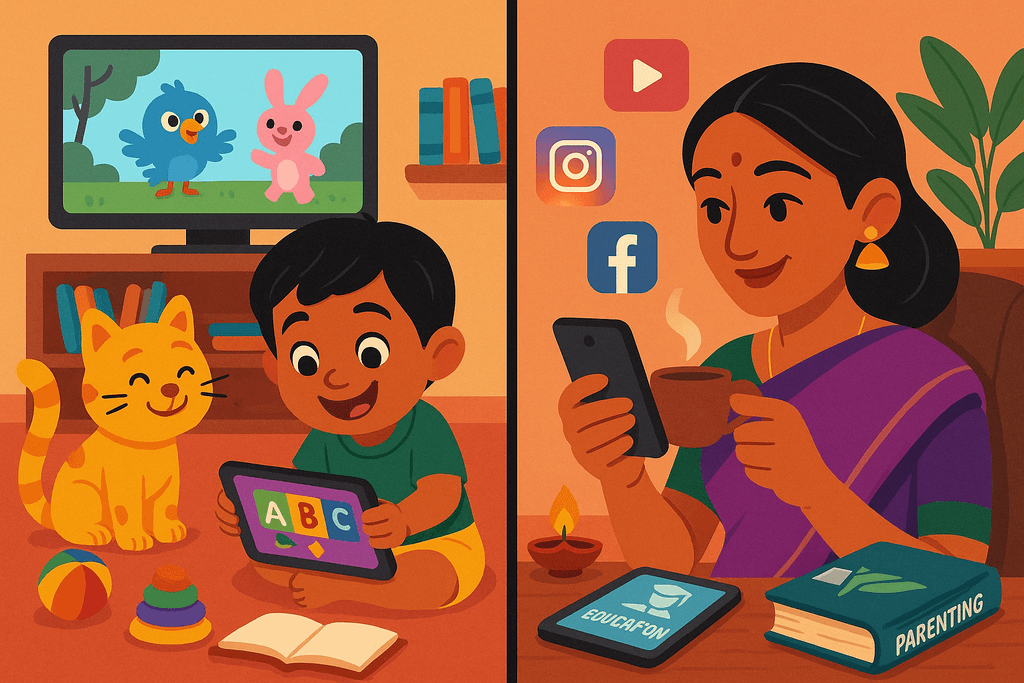
The study focuses on two primary stakeholders, while also acknowledging the presence of numerous external influencers that impact each of them.
The study focuses on two primary stakeholders, while also acknowledging the presence of numerous external influencers that impact each of them.
The Child (Primary User)
Age Group: 2–7 years
Role: Primary user
Dependency Level: Highly dependent on parents
Key Influences:
Media Exposure: TV shows, digital content
Peer Group: Friends from playgroups or school
Educational Environment: Preschools and early education centers
Cultural & Social Context: Strong influence from parents and extended family
Needs:
Engaging, playful, and educational content
Age-appropriate learning material rooted in familiar cultural context
Safe and intuitive digital interactions
The Child (Primary User)
Age Group: 2–7 years
Role: Primary user
Dependency Level: Highly dependent on parents
Key Influences:
Media Exposure: TV shows, digital content
Peer Group: Friends from playgroups or school
Educational Environment: Preschools and early education centers
Cultural & Social Context: Strong influence from parents and extended family
Needs:
Engaging, playful, and educational content
Age-appropriate learning material rooted in familiar cultural context
Safe and intuitive digital interactions
The Parent (Decision Maker)
Age Group: 25–35 years
Role: Decision maker and buyer
Influence Level: Controls access, purchasing, and screen time
Key Influences:
Media Exposure: Social media, digital trends, global parenting content
Peer Group: Colleagues, other parents, parenting communities
Cultural & Social Context: Family expectations and societal norms
Needs:
Affordable and trustworthy educational solutions
Content aligned with values and cultural relevance
Assurance of safety, quality, and positive developmental impact
The Parent (Decision Maker)
Age Group: 25–35 years
Role: Decision maker and buyer
Influence Level: Controls access, purchasing, and screen time
Key Influences:
Media Exposure: Social media, digital trends, global parenting content
Peer Group: Colleagues, other parents, parenting communities
Cultural & Social Context: Family expectations and societal norms
Needs:
Affordable and trustworthy educational solutions
Content aligned with values and cultural relevance
Assurance of safety, quality, and positive developmental impact
UX for Kids
UX for Kids
Design Principles for Building Digital Ecosystems for Children
Based on the book “Design for Kids” by Debra Levin Gelman
Color Usage
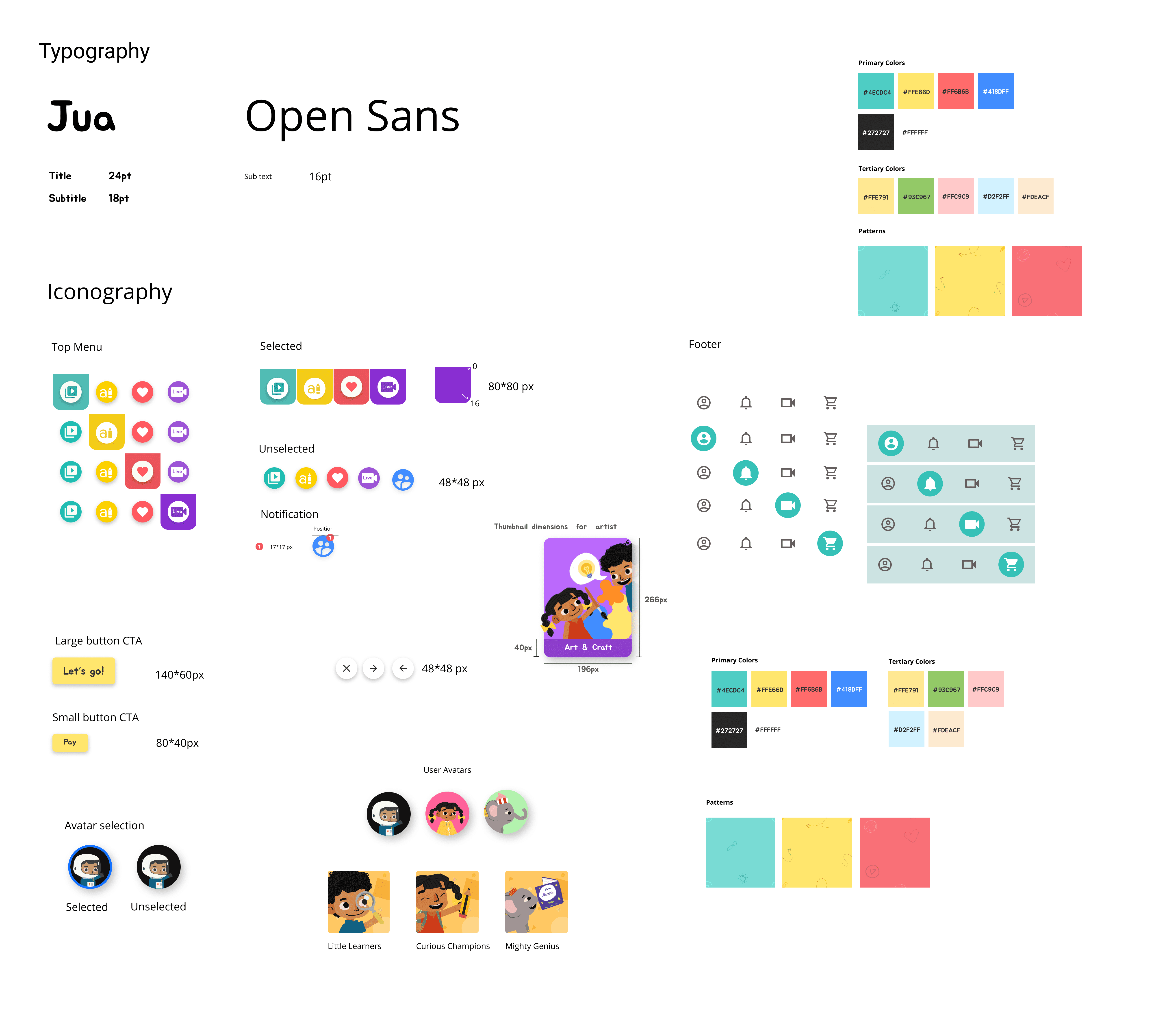
Children’s digital applications commonly use bold, high-contrast colors and patterns to grab attention and maintain engagement. While this can enhance the user experience, overuse or poor color choices can lead to cognitive overload and frustration. A thoughtfully curated color palette with intentional contrast is essential to creating a visually engaging yet calming interface for kids.
Typography
Text should be used sparingly, except in areas specifically intended for reading or language development. Introduce small, simple words gradually as the child’s reading and phonetic skills evolve. Reinforce learning by prompting children to repeat words aloud at regular intervals, encouraging verbal interaction and retention.
Evident Interaction Elements
Interactive elements such as buttons or tappable icons should be clearly distinguishable and appropriately sized for small hands. Visual enhancements like drop shadows, outlines, and distinct color contrasts help children easily identify clickable areas and reduce ambiguity.
Assistive Cues
To guide children’s actions, applications should incorporate assistive cues such as audio prompts and subtle animations. These cues reinforce interaction patterns and encourage children to engage with the interface intuitively, supporting both learning and exploration.
Design Principles for Building Digital Ecosystems for Children
Based on the book “Design for Kids” by Debra Levin Gelman
Color Usage
Children’s digital applications commonly use bold, high-contrast colors and patterns to grab attention and maintain engagement. While this can enhance the user experience, overuse or poor color choices can lead to cognitive overload and frustration. A thoughtfully curated color palette with intentional contrast is essential to creating a visually engaging yet calming interface for kids.
Typography
Text should be used sparingly, except in areas specifically intended for reading or language development. Introduce small, simple words gradually as the child’s reading and phonetic skills evolve. Reinforce learning by prompting children to repeat words aloud at regular intervals, encouraging verbal interaction and retention.
Evident Interaction Elements
Interactive elements such as buttons or tappable icons should be clearly distinguishable and appropriately sized for small hands. Visual enhancements like drop shadows, outlines, and distinct color contrasts help children easily identify clickable areas and reduce ambiguity.
Assistive Cues
To guide children’s actions, applications should incorporate assistive cues such as audio prompts and subtle animations. These cues reinforce interaction patterns and encourage children to engage with the interface intuitively, supporting both learning and exploration.
Feedback from external sources
Feedback from external sources
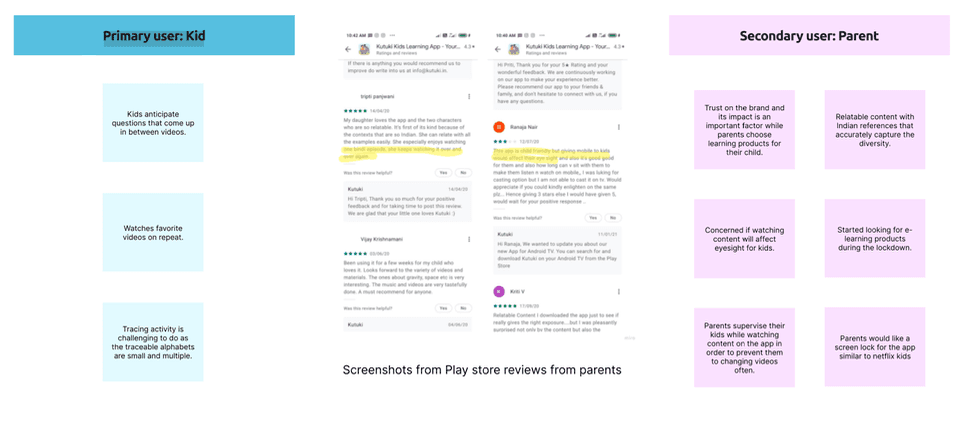
Upon understanding the core principles of designing UX for Indian preschoolers, the team analyzed user feedback by reviewing parent comments on the Play Store. This qualitative data offered valuable insights into how the product is perceived and used in real-world contexts.
The analysis helped differentiate the needs and expectations of the two key user groups:
Primary User – Children: The end users who interact directly with the app and require engaging, age-appropriate, and intuitive experiences.
Secondary User – Parents: The decision-makers and purchasers who assess the app’s educational value, cultural relevance, safety, and usability.
This distinction allowed the team to tailor design strategies to serve both audiences effectively, ensuring the product is both enjoyable for children and trusted by parents.
Upon understanding the core principles of designing UX for Indian preschoolers, the team analyzed user feedback by reviewing parent comments on the Play Store. This qualitative data offered valuable insights into how the product is perceived and used in real-world contexts.
The analysis helped differentiate the needs and expectations of the two key user groups:
Primary User – Children: The end users who interact directly with the app and require engaging, age-appropriate, and intuitive experiences.
Secondary User – Parents: The decision-makers and purchasers who assess the app’s educational value, cultural relevance, safety, and usability.
This distinction allowed the team to tailor design strategies to serve both audiences effectively, ensuring the product is both enjoyable for children and trusted by parents.
Survey
Survey
User Research Objective
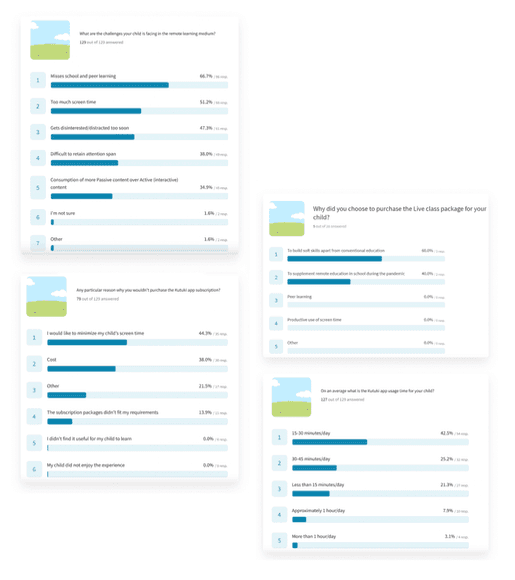
The primary goal of this user research study was to gather qualitative insights into the Kutuki app experience from both children (the end users) and their parents (the decision-makers). Building on findings from secondary research, a concise questionnaire was developed to capture relevant feedback.
Methodology
Survey Platform: Typeform
Respondents:
Subscribers: 66 responses
Non-Subscribers: 126 responses
Key Areas of Focus
Overall customer experience with the Kutuki app
Usage behavior and interaction patterns of children
Comparison between expected digital learning outcomes and Kutuki’s actual learning experience
Impact of the COVID-19 pandemic on early learning and evolving user behaviors
User Research Objective
The primary goal of this user research study was to gather qualitative insights into the Kutuki app experience from both children (the end users) and their parents (the decision-makers). Building on findings from secondary research, a concise questionnaire was developed to capture relevant feedback.
Methodology
Survey Platform: Typeform
Respondents:
Subscribers: 66 responses
Non-Subscribers: 126 responses
Key Areas of Focus
Overall customer experience with the Kutuki app
Usage behavior and interaction patterns of children
Comparison between expected digital learning outcomes and Kutuki’s actual learning experience
Impact of the COVID-19 pandemic on early learning and evolving user behaviors
Telephoic interview
Telephoic interview
In-Depth User Interviews
The primary objective of this user research was to gather feedback on the user experience of the existing Kutuki mobile app. Insights from the initial survey informed the structure of follow-up interviews, allowing for deeper exploration of user perceptions and behaviors.
Sample Size: 12 participants
Format: 15–20 minute calls
Key Considerations
Due to pandemic-related constraints, direct interviews with children via phone or video calls proved ineffective. As a result, all data was gathered through conversations with their parents, who observed and guided their children’s interactions with the app.
Research Prompt
How might we leverage these user insights to enhance the Kutuki app experience and uncover new opportunities for engagement and learning?
In-Depth User Interviews
The primary objective of this user research was to gather feedback on the user experience of the existing Kutuki mobile app. Insights from the initial survey informed the structure of follow-up interviews, allowing for deeper exploration of user perceptions and behaviors.
Sample Size: 12 participants
Format: 15–20 minute calls
Key Considerations
Due to pandemic-related constraints, direct interviews with children via phone or video calls proved ineffective. As a result, all data was gathered through conversations with their parents, who observed and guided their children’s interactions with the app.
Research Prompt
How might we leverage these user insights to enhance the Kutuki app experience and uncover new opportunities for engagement and learning?
Interview notes
Interview notes
Research Focus Areas and Emerging Insights
The research plan included targeted questions and prompts designed to validate prior assumptions and uncover user needs. The goal was to gather evidence on how parents perceive and support their child’s learning journey through the Kutuki app.
1. Parental Involvement in Learning
Active Participation: Parents expressed a strong desire to be involved in their child’s early learning journey.
Regional Language Phonics: Many parents who are not fluent in English requested phonics lessons in regional languages, enabling them to better support and guide their children at home.
Progress Tracking: Parents want tools to review their child’s learning progress and identify areas of interest based on the type of content being consumed and resonated with.
2. Reducing Screen Time
Offline Learning Aids: There is a growing demand for offline, activity-based content that complements the digital lessons—such as worksheets, printable materials, or hands-on activities.
Cross-Device Compatibility: Parents prefer options to cast content to larger screens like TVs or desktops to reduce direct mobile screen exposure for kids.
3. Enhancing the Learning Experience
Content Sequencing: Structured content with progressive learning paths was highlighted as a way to make lessons more effective and cohesive.
Interactive Storytelling: Parents responded positively to the idea of interactive, choice-driven stories that allow children to influence the narrative—making the learning experience more immersive and two-way.
Content Discovery: A recurring concern was that children quickly lose interest in repeated content. There is a need for mechanisms to help kids explore fresh, personalized content each time they engage with the app.
Research Focus Areas and Emerging Insights
The research plan included targeted questions and prompts designed to validate prior assumptions and uncover user needs. The goal was to gather evidence on how parents perceive and support their child’s learning journey through the Kutuki app.
1. Parental Involvement in Learning
Active Participation: Parents expressed a strong desire to be involved in their child’s early learning journey.
Regional Language Phonics: Many parents who are not fluent in English requested phonics lessons in regional languages, enabling them to better support and guide their children at home.
Progress Tracking: Parents want tools to review their child’s learning progress and identify areas of interest based on the type of content being consumed and resonated with.
2. Reducing Screen Time
Offline Learning Aids: There is a growing demand for offline, activity-based content that complements the digital lessons—such as worksheets, printable materials, or hands-on activities.
Cross-Device Compatibility: Parents prefer options to cast content to larger screens like TVs or desktops to reduce direct mobile screen exposure for kids.
3. Enhancing the Learning Experience
Content Sequencing: Structured content with progressive learning paths was highlighted as a way to make lessons more effective and cohesive.
Interactive Storytelling: Parents responded positively to the idea of interactive, choice-driven stories that allow children to influence the narrative—making the learning experience more immersive and two-way.
Content Discovery: A recurring concern was that children quickly lose interest in repeated content. There is a need for mechanisms to help kids explore fresh, personalized content each time they engage with the app.
Brainstorm
Brainstorm
To improve the Kutuki app experience, the design and product teams conducted a structured brainstorming session using “How Might We” (HMW) statements as prompts. Ideas were categorized into key themes aligned with the product’s goals and user needs:
1. Engaging Learning Experience
Introduce characters as learning companions who grow with the child throughout their journey.
Support day/night modes to align with a child’s routine and offer a comforting visual experience.
Use highly communicative thumbnails to help kids recognize content easily.
2. Structured and Evolving Learning Journey
Design a progressive learning path with modules that adapt to the child’s developmental stage.
Include a personalized profile section and learning reports to help parents track progress.
Integrate a daily challenge module to encourage routine engagement.
Involve users early on through a more interactive onboarding experience.
3. Interactive Quizzes and Games
Implement in-video quizzes using frozen video frames and pop-up questions.
Add audio feedback and visual cues for screen interactions to aid comprehension and retention.
4. Easy Navigation and Discovery
Add a scroll indicator slider (e.g., with Minku) to help kids understand navigation length.
Allow creation of video albums based on themes (e.g., mealtime, bedtime).
Enable a collection of favorites and use color-coded guides for easier app navigation.
Build scalable templates for quiz modules to support content growth.
5. Context-Relevant Interactive Elements
Use celebratory indicators to show learning milestones and encourage motivation.
Incorporate collectibles as rewards throughout the app journey.
Use clear iconography to distinguish between video, quiz, and activity modules.
Enhance drawing/tracing tools with creative options like crayons or erasers.
This collective vision aims to create a joyful, intuitive, and culturally relevant learning environment that keeps preschoolers engaged while giving parents visibility and control.
To improve the Kutuki app experience, the design and product teams conducted a structured brainstorming session using “How Might We” (HMW) statements as prompts. Ideas were categorized into key themes aligned with the product’s goals and user needs:
1. Engaging Learning Experience
Introduce characters as learning companions who grow with the child throughout their journey.
Support day/night modes to align with a child’s routine and offer a comforting visual experience.
Use highly communicative thumbnails to help kids recognize content easily.
2. Structured and Evolving Learning Journey
Design a progressive learning path with modules that adapt to the child’s developmental stage.
Include a personalized profile section and learning reports to help parents track progress.
Integrate a daily challenge module to encourage routine engagement.
Involve users early on through a more interactive onboarding experience.
3. Interactive Quizzes and Games
Implement in-video quizzes using frozen video frames and pop-up questions.
Add audio feedback and visual cues for screen interactions to aid comprehension and retention.
4. Easy Navigation and Discovery
Add a scroll indicator slider (e.g., with Minku) to help kids understand navigation length.
Allow creation of video albums based on themes (e.g., mealtime, bedtime).
Enable a collection of favorites and use color-coded guides for easier app navigation.
Build scalable templates for quiz modules to support content growth.
5. Context-Relevant Interactive Elements
Use celebratory indicators to show learning milestones and encourage motivation.
Incorporate collectibles as rewards throughout the app journey.
Use clear iconography to distinguish between video, quiz, and activity modules.
Enhance drawing/tracing tools with creative options like crayons or erasers.
This collective vision aims to create a joyful, intuitive, and culturally relevant learning environment that keeps preschoolers engaged while giving parents visibility and control.
Information Architecture
Information Architecture
The updated information architecture aims to improve content discoverability and streamline navigation for both children and parents.
Simplified Navigation: Content is now better clustered for the child user, while all parent-related controls and settings are consolidated into a single, clearly marked section. Access to this section is protected by a one-time parental gate, reducing friction compared to the previous requirement of entering it three times across the app.
Favorites Section: A dedicated ‘Favorite Videos’ section has been introduced to help children quickly find and revisit the content they love most.
Progressive Learning Path: The learning modules are now structured along a clearly defined path, with content that gradually increases in complexity based on the user’s selected learning level, enabling a more personalized and effective learning journey.
The updated information architecture aims to improve content discoverability and streamline navigation for both children and parents.
Simplified Navigation: Content is now better clustered for the child user, while all parent-related controls and settings are consolidated into a single, clearly marked section. Access to this section is protected by a one-time parental gate, reducing friction compared to the previous requirement of entering it three times across the app.
Favorites Section: A dedicated ‘Favorite Videos’ section has been introduced to help children quickly find and revisit the content they love most.
Progressive Learning Path: The learning modules are now structured along a clearly defined path, with content that gradually increases in complexity based on the user’s selected learning level, enabling a more personalized and effective learning journey.

Add-on Feature
Add-on Feature
Guilt-Free Screen Time
Screen time remains a major concern for parents, yet children’s engagement with digital media continues to rise. Instead of exhausting efforts trying to eliminate screen time altogether—a strategy that often proves ineffective—we believe the focus should shift to making screen time meaningful. By using technology thoughtfully, we can transform screen time into a guilt-free, enriching experience that supports learning, creativity, and cultural connection.
Guilt-Free Screen Time
Screen time remains a major concern for parents, yet children’s engagement with digital media continues to rise. Instead of exhausting efforts trying to eliminate screen time altogether—a strategy that often proves ineffective—we believe the focus should shift to making screen time meaningful. By using technology thoughtfully, we can transform screen time into a guilt-free, enriching experience that supports learning, creativity, and cultural connection.

Conclusion
Conclusion
The redesign and research of the Kutuki app aimed to create a culturally relevant, engaging, and developmentally appropriate learning experience for Indian preschoolers. Through extensive market research, user interviews, and Play Store review analysis, the team identified key user needs—ranging from content discoverability to screen-time management and culturally rooted storytelling.
The updated information architecture and interaction design now support a more intuitive navigation experience, personalized learning paths, and increased parental involvement, all while keeping the child at the center of the design. By integrating playful learning, clear UX patterns, and feedback-driven iterations, Kutuki is better positioned to deliver meaningful early education and stand out in the global edtech landscape.
This project underscores the importance of inclusive design, localized content, and continuous user feedback in building impactful digital products for young learners.
The redesign and research of the Kutuki app aimed to create a culturally relevant, engaging, and developmentally appropriate learning experience for Indian preschoolers. Through extensive market research, user interviews, and Play Store review analysis, the team identified key user needs—ranging from content discoverability to screen-time management and culturally rooted storytelling.
The updated information architecture and interaction design now support a more intuitive navigation experience, personalized learning paths, and increased parental involvement, all while keeping the child at the center of the design. By integrating playful learning, clear UX patterns, and feedback-driven iterations, Kutuki is better positioned to deliver meaningful early education and stand out in the global edtech landscape.
This project underscores the importance of inclusive design, localized content, and continuous user feedback in building impactful digital products for young learners.